Bank ID logo
1. Basic variants of the logo

#000000
Basic logo for a light background (preferred option if SePa application does not have a dark background)
#FFFFFF
Logo in negative design for a dark background
Examples of displaying the logo on a light and dark background
Basic logo for a light background (preferred option if SePa application does not have a dark background)
Logo in negative design for a dark background
The contrast between the logo and the background of the SePa application should be sufficient so that the Bank iD logo is clearly visible.
2. Logo protection zone
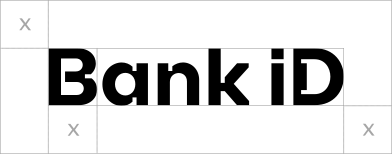
The protection zone of the logo is at least 5/6 of the height of the logo, no element (such as text or image) may interfere with the protection zone of the logo.
3. Minimum logo size
80 px

The logo size for the digital user interface is at least 80px wide to ensure flawless display of the logo.
The minimum size of the logo in printed materials is specified in Brand manual Bank iD.
4. Use of the logo
- SeP can use the logo on its website or in the application when informing about the Bank iD service, for choosing the user's identity verification method, etc. The logo is available for download here.
- The logo can be clickable, but only on Bank iD website.
- To start the Bank iD service in the SePa user interface (e.g. to display the bank selection guide, etc.), you must always use the CTA button.
5. Accessibility
- To ensure accessibility, you need to add alternative text (ALT) to the logo so that the reader can read the logo description to the user.
- More information on accessibility is provided in the WCAG guideline.
6. Bank iD as text
The word "Bank iD" is written in the text in the same way as the logo, with a space between "Bank" and "id", with a capital initial letter "B", with a small "i" and a capital "D" at the end.